
$ git contrib
You probably don't know me so much but I love when something is perfect, shiny, well designed. Yes, some people could say I'm a maniac. Anyway. 😜
So why we're here today. We are here today because I want to talk about how to make a good fork on GitHub (or whatever but my command only works on GitHub yet) to contribute to a project and not to have an alternative of this one.
Indeed, when you fork, you could have two ideas behind:
-
Because you want to make your own version of this project
-
Because you want to contribute by making some PRs to this project where you aren't not a maintainer (yet?)
This is the second case we're interested.
If you fork only because you want to contribute, in my opinion, you should notify any visitor that it is not a project they can use.
And as developer, you won't care so much about your `master` branch, you won't update it, you won't use it to make your PR, you only will only submit feature branches, one by one.
So. How to do this?
We'll make the command step-by-step.
First of all, we fork a project via this great cli command:
#! /usr/bin/env zsh

gh repo fork $1 --clone
Fine. Now we want to create the `master` branch as an orphan one where we notify the user it is not a real project, just a contribution.
#! /usr/bin/env zsh

gh repo fork $1 --clone

{...}

git co -b tmp &&
git branch -D master &&
git checkout --orphan master &&
git branch -D tmp &&
git rm -rf . &&
rm '.gitignore' &> /dev/null
echo "**Repository used only for submitting PRs. 🙌**" > README.md &&
git add README.md &&
git commit -a -m "Initial Commit" &&
git push -f origin master
As you can read, we create a temporary branch, we delete `master`, we recreate master as orphan, we remove any tracked files, and we create a commit with only a README saying what we want to notify. And finally we force push it.
This is what we've got:
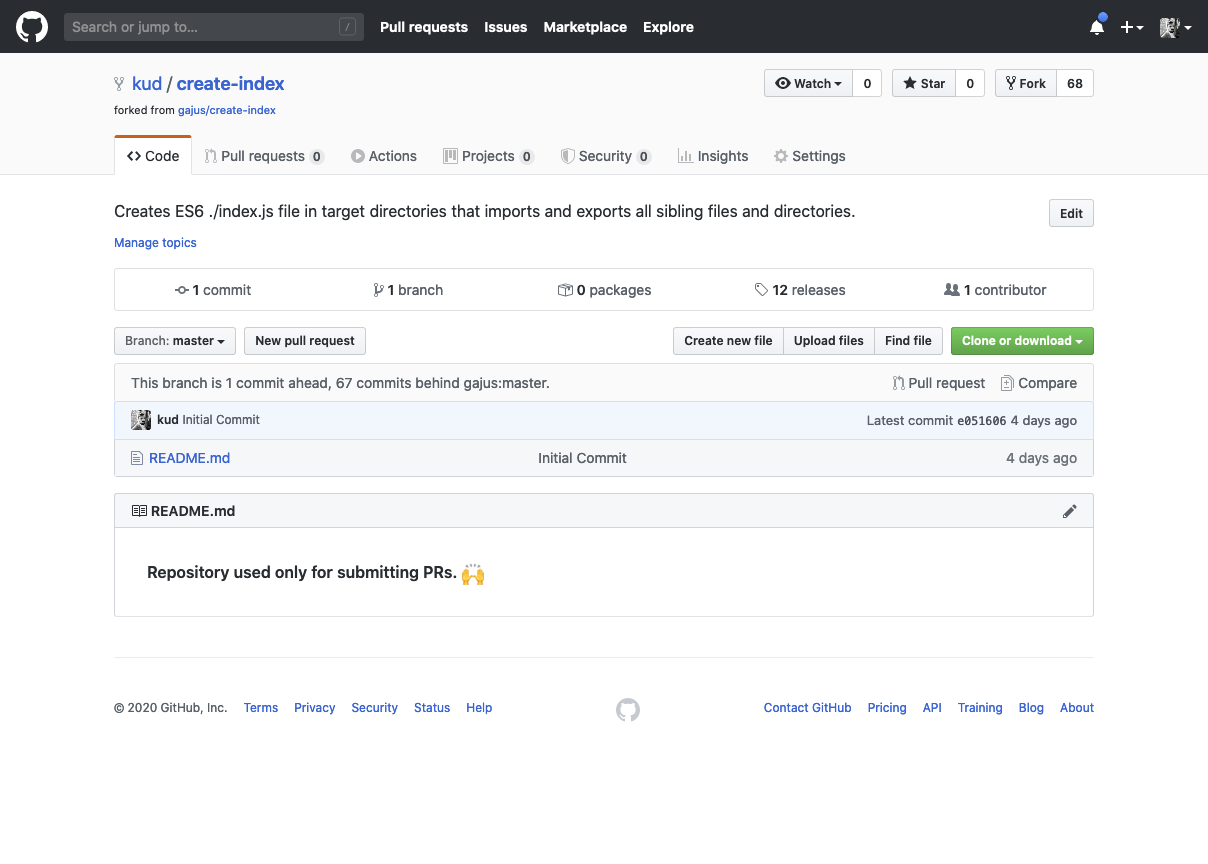
Now if anyone goes to your fork project, they know it is not an extended one, just your base to contribute.
The final script. We just need a way to get to name of the project to open it in the shell.
#! /usr/bin/env zsh

# ex: git contrib git@github.com:gajus/create-index.git

REPO_SPLIT_SLASH=${${1}[(ws:/:)2]}
REPO_SPLIT_DOT=${${REPO_SPLIT_SLASH}[(ws:.:)1]}
REPO=$REPO_SPLIT_DOT

gh repo fork $1 --clone &&
cd $REPO &&

git co -b tmp &&
git branch -D master &&
git checkout --orphan master &&
git branch -D tmp &&
git rm -rf . &&
rm '.gitignore' &> /dev/null
echo "**Repository used only for submitting PRs. 🙌**" > README.md &&
git add README.md &&
git commit -a -m "Initial Commit" &&
git push -f origin master
And how to use it:
$ git contrib git@github.com:gajus/create-index.git
You'll get a new project called there `create-index` as folder with those settings for remote:
# $ git remote -v
origin  git@github.com:kud/create-index.git (fetch)
origin  git@github.com:kud/create-index.git (push)
upstream  git@github.com:gajus/create-index.git (fetch)
upstream  git@github.com:gajus/create-index.git (push)
So clean! 🙌🏻
Now we're good and can contribute to lots of projecs, oh yeaaaaaah.
Want to see all my git commands? This is on my environment manager project.